Put Claude Code, Codex and Antigravity on one team.
One agent leads. The others build, review and test, and nothing merges until a different agent has checked it.
Claude Code leads
$ claude plugin marketplace add https://github.com/Ninety2UA/agent-triforge $ claude plugin install agent-triforge@agent-triforgeCodex leads
$ codex plugin marketplace add Ninety2UA/agent-triforge $ codex plugin add agent-triforge@agent-triforgeThe lead merges task 2. Every change was reviewed by an agent that didn't write it.
Each agent gets a role
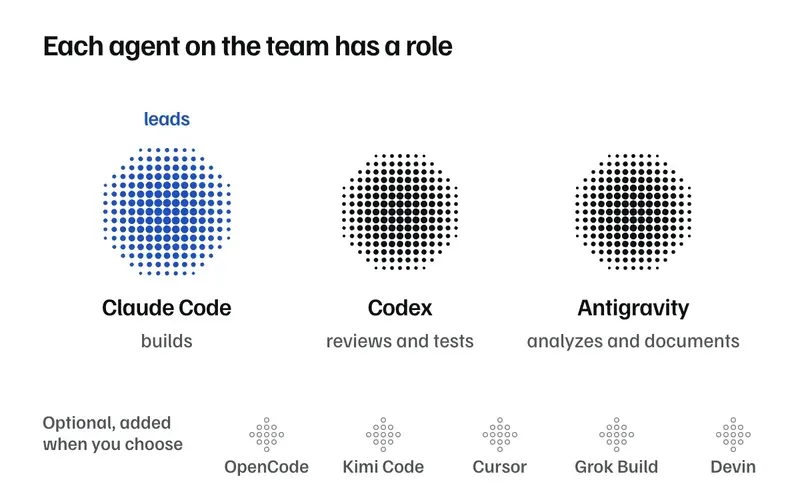
The lead plans the work, hands it out and merges it. Claude Code leads by default and Codex can lead too. The others work in the roles one editable file gives them, and every fallback ends at Claude Code, Antigravity or Codex.
Always on the team
- Claude CodeLeads by default and builds.Code goes to Anthropic
- AntigravityMaps the codebase and writes docs.Code goes to Google
- CodexReviews and tests. Can lead.Code goes to OpenAI
Join when you add them
- OpenCodeAny role.Code goes to Zhipu / Z.ai via OpenRouter
- Kimi CodeAny role.Code goes to Moonshot
- CursorAny role.Code goes to xAI via Cursor
- Grok BuildBuilder, reviewer or analyst.Code goes to xAI
- DevinReviewer or analyst, after your consent.Code goes to Cognition
| Role | Does | Agent | Falls back to |
|---|---|---|---|
builder | Writes the code for a task | Claude Code | Codex, then Antigravity |
reviewer | Reviews every task it didn't build | Codex | Antigravity, then Claude Code |
tester | Writes the failing test first | Codex | Claude Code |
analyst | Maps the codebase before planning | Antigravity | Claude Code |
documenter | Writes the documentation | Antigravity | Claude Code |
One task's life
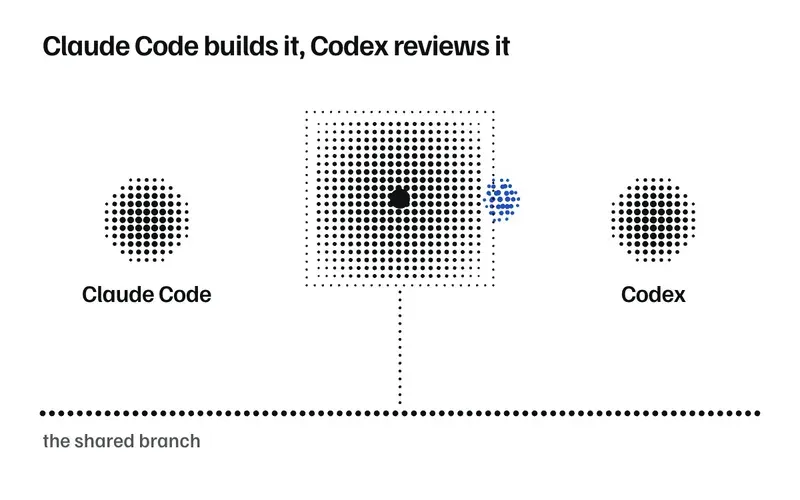
Every task is built in its own git worktree, the lead's own tasks included. It merges only after a reviewer approves it, and the reviewer has to be a different agent from the one that built it.
Assigned
The lead gives task 1 to Claude Code, in a workspace of its own.
Built
Claude Code builds it and reports back that it's done.
Reviewed
Codex reviews the change. It didn't write it.
Antigravity reviews the change. It didn't write it.
A protected file: only the lead or you can review it. Claude Code leads and built it, so you do.
Refused. An agent can't review its own work.
Merged
The lead merges its own copy of the change.
Merged after your review.
Not reached.
On main
The lead moves the finished work to main.
Waits for your approval before it reaches main.
Not reached.
Merged and on main. Codex reviewed what Claude Code built, and the lead merged it.
Watch one sprint
An example sprint, rate-limiting a login endpoint, from the goal to the finished work. 55 seconds, no sound. Pick a chapter to jump to it.
From goal to finished sprint
/at-ship <goal> runs every phase in one session. Choose a phase to see which skills run it and who does the work.
Pre-plan: Search what earlier sprints learned
Before anything is planned, the learnings-researcher persona searches the notes earlier sprints left behind.
- Persona
learnings-researcher- Reads
ops/solutions/ops/decisions/- Who
- The lead starts it.
Phase 0: Map the codebase
Antigravity, in the analyst role, maps structure, data flow and interfaces. It is skipped when the codebase has not changed or the fix is small.
- Skill
codebase-mapping- Writes
ops/ARCHITECTURE.md- Who
- Analyst: Antigravity, falling back to Claude Code.
Phase 1: Turn the goal into tasks
The lead writes tasks in waves and traces how each can fail. In Phase 1.1 it brings you the 3 riskiest assumptions to confirm.
- Skills
at-planwriting-plansshadow-path-tracing- Writes
ops/TASKS.md- Who
- The lead, with you on the assumptions.
Phase 1.5: Check the plan before building
plan-checker reviews the plan until it approves, three rounds at most, and anything short of an explicit approval stops the plan. If the plan passes 15 tasks, scope-cutting can cut it by value.
- Persona
plan-checker- Skill
scope-cutting- Who
- plan-checker, never moved to a smaller model.
Phase 2: Build, review, merge
Each task gets its own worktree. A builder writes it, a pinned reviewer from a different roster member checks it, and the lead squash-merges its own copy. integration-verifier runs between waves, and only its explicit PASS moves on.
- Skills
at-buildwave-orchestration- Writes
ops/leases.tomlops/CHANGELOG.md- Who
- Builder: Claude Code. Reviewer: Codex.
Phases 3 and 4: Review in parallel until it converges
In at-ship, five lanes review at once: Antigravity, Codex, security-sentinel, performance-oracle and code-simplicity-reviewer. findings-synthesizer merges them, and a lane that reports less than complete coverage blocks convergence. Fixes loop at most 3 cycles, and a cycle with a P1 or P2 fix reviews the changed files again.
- Skills
at-reviewreview-synthesisiterative-refinement- Writes
ops/REVIEW_*.md- Who
- Reviewer lanes from the roster, plus the specialist personas.
Phase 5: Failing test first, then green
test-gap-analyzer finds the untested paths. The tester writes the failing test first, and fixes run until the suite passes.
- Skill
at-test- Writes
ops/TEST_RESULTS.md- Who
- Tester: Codex, falling back to Claude Code.
Phase 6: Write it down, then mark it done
What the sprint learned goes to ops/solutions/, review files to ops/archive/, the checkpoint to ops/STATE.md. ops/.sprint-complete is created last, after the checklist passes.
- Skills
at-wrapknowledge-compoundingverification-before-completionsession-continuity- Writes
ops/STATE.mdops/.sprint-complete- Who
- The lead.
Seventeen workflows, ten portable skills
Workflows named at-* run in the lead. Portable skills work in any agent and usually start on their own when the context fits. Here are twelve of the 27.
Showing 12 of 12 featured skills
at-shipOne sprint on its own: analyze, plan, build, review, test, wrap, then mark it complete.
Use it when a scoped goal should ship in one run.
at-coordinateThe plain Phase 0 to 6 cycle that
coordinate.shdrives, session after session.Use it for the same sprint without convergence or team flags.
at-planTurns a goal into
ops/TASKS.mdwith waves, failure paths and aplan-checkerverdict.Use it when you want to read the plan before anything is built.
at-buildBuilds tasks in waves, pins a reviewer to each and merges what passes.
Use it when
ops/TASKS.mdholds assigned tasks.at-reviewReview lanes from the roster plus specialist reviewers, merged into one report.
Use it when built tasks need Phase 3 and 4 review.
at-testFinds untested paths, gets tests from the roster tester, fixes until green.
Use it when changed code needs Phase 5 testing.
at-wrapRecords what was learned, archives review files, writes
STATE.md, marks completion.Use it when a sprint or a session ends.
at-quickA test-first change with a self-review and no swarm.
Use it for fewer than 3 files with no shared interface or protected path.
at-debugReproduce, find the root cause with evidence, fix, write it down.
Use it when a bug report or an error needs a cause.
wave-orchestrationLeases, pinned cross-review and merges in wave order.
Use it when a validated plan has two or more tasks.
verification-before-completionFresh evidence behind every claim that something is done.
Use it before calling anything done.
knowledge-compoundingWrites a note only when a future agent would repeat the mistake without it.
Use it when a task ends with something learned.
Why it holds up
No agent merges its own work
A task merges only after a pinned reviewer approves it, and the helper refuses to pin the agent that built it. The lead's own tasks follow the same rule. After three fix cycles with the same reviewer, you decide.
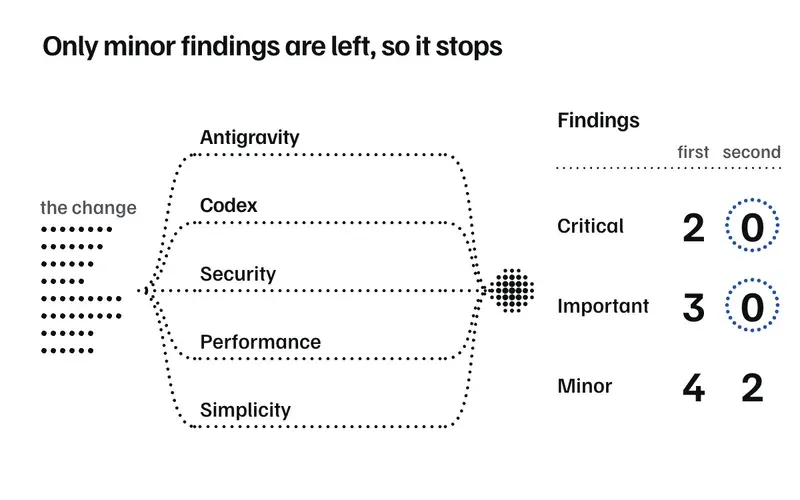
Reviews run until findings converge
Each reviewer writes its own file, so they can all run at once. Findings are P1, P2 or P3 with a confidence tier, and a low-confidence finding is never P1. You pick where the loop stops.
| Mode | Stops when |
|---|---|
fast | no P1 is left |
standard | no P1 or P2 is left (the default) |
deep | no P1 or P2, and fewer than 3 P3 |
Done needs fresh evidence
verification-before-completion asks for new evidence behind every claim. A builder's report has to end in a typed status, and a clean exit without one counts as a missing report.
Tests: 14 passed, 0 failed
Concerns: the limiter's window is per process
Discoveries for later tasks: None
Status: DONE_WITH_CONCERNS
A sprint is done only when the lead creates ops/.sprint-complete, after the checklist passes.
What a sprint learns, the next one reads
knowledge-compounding writes a note only when a future agent would repeat the mistake without it. Before the next plan, learnings-researcher searches those notes.
ops/solutions/
  login-rate-limit-window.md
  redis-test-fixture.md
ops/decisions/
  limiter-per-ip-not-per-user.md
ops/STATE.md
Specialist reviewers
There are 19 personas, each with its own tools, starting model and turn budget. These five check the plan and review the code in /at-ship.
security-sentinelReviews for security and nothing else: OWASP-class issues, in depth.
Never moved to a smaller modelperformance-oracleFinds bottlenecks and scaling problems, such as nested loops over the same data.
code-simplicity-reviewerFlags complexity the change does not need, like an interface with one implementation.
findings-synthesizerReads every review file, removes duplicates, sets confidence tiers and writes one report.
Never moved to a smaller modelplan-checkerChecks the plan before anything is built, and keeps checking until it approves.
Never moved to a smaller model
Leave it running
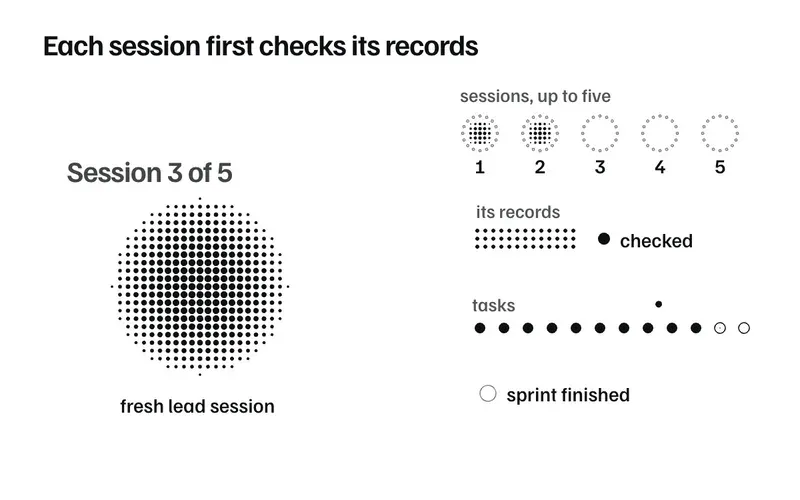
/at-ship runs a whole sprint in one session. For bigger goals, coordinate.sh starts fresh lead sessions until the sprint is marked done.
- Five sessions at most by default;
--maxchanges it. - An integrity check runs before each session.
- It stops on a login or quota failure.
- It tells you through a webhook and a desktop notification.
$ TRIFORGE="$(tail -n 1 .agents/triforge-plugin-root.local)" $ bash "$TRIFORGE/scripts/coordinate.sh" "Build auth" --dry-run $ bash "$TRIFORGE/scripts/coordinate.sh" "Build auth" --max 5 --convergence deep --team A Codex lead also needs --allow-full-access, which only you can pass.
What it does not do
It does not sandbox workers.
A worktree sets where a worker starts. A worker with a shell can still read and write anything your user account can, including other branches and the ledger.
It detects changes, and merges only the lead's snapshot.
Lease helpers compare git config, hooks, refs, worktree pointers and the ledger with a recorded baseline. On a change the lead did not make, they refuse with rc 44. Only the lead's own snapshot of a task is ever merged.
Each agent's provider sees the code it is handed.
Anthropic, Google and OpenAI for Claude Code, Antigravity and Codex, plus the provider of each optional member you add. Devin may train on data unless the account opts out, so Triforge records your consent before it joins. Captured output is scrubbed before it lands in ops/.
Install in two commands
Claude Code leads
$ claude plugin marketplace add https://github.com/Ninety2UA/agent-triforge $ claude plugin install agent-triforge@agent-triforgeAdd --scope project to the install line to share it with your team.
Codex leads
$ codex plugin marketplace add Ninety2UA/agent-triforge $ codex plugin add agent-triforge@agent-triforgeA Codex lead also needs a trust entry you add by hand to ~/.codex/config.toml. /at-setup prints it and never writes it.
[projects."/abs/path"]
trust_level = "trusted"
Skills only
$ devin plugins install Ninety2UA/agent-triforge#skills $ pi install git:github.com/Ninety2UA/agent-triforge The ten portable skills only, for Devin or Pi: no lead workflows, hooks or agents.
Before you start
- Claude Code, Antigravity (
agy) and Codex installed and logged in. - Python 3.
- On macOS, GNU coreutils (
brew install coreutils). Without atimeoutbinary the helper refuses external calls. - Claude Code 2.1.314, agy 1.1.27 and Codex 0.153.0, or later. A lead alone runs from Claude Code 2.1.277, but the default Claude builder needs 2.1.314.
Your first run
- Start
claudeorcodexin your project. That createsops/. - Run
/at-setupto pick the lead, check Claude Code, Antigravity and Codex, and set roles. - Run
/at-ship <goal>.
Run your first sprint
Install the plugin, start Claude Code or Codex in your project, run /at-setup, then /at-ship <goal>.
Claude Code leads
$ claude plugin marketplace add https://github.com/Ninety2UA/agent-triforge $ claude plugin install agent-triforge@agent-triforgeCodex leads
$ codex plugin marketplace add Ninety2UA/agent-triforge $ codex plugin add agent-triforge@agent-triforge